Showing posts with label Adsense Tips. Show all posts

Some Effective Tips To Increase Google Adsense CTR

How to make more money with Google Adsense? Get more clicks on ads. We all want to increase Google Adsense CTR i.e. click through ratio, because the higher times the surfer clicks the Adsense ad, higher is the payout to you. So here are 15 effective ways to improve your Adsense CTR.

How to increase Google Adsense CTR?

  • Post Adsense ads them on text rich pages and make sure that Adsense had a bunch of keywords to work with. Getting Higher paying keywords is better of course.
  • Get rid of public service ads, which pay you nothing for your efforts. Here are some ways to avoid getting PSA’s.
  • Avoid titles like the approved ‘Sponsored Links’ and ‘Advertisements’ above the Adsense ads. Why do you want to tell the world they are ads when google already puts ‘Ads by Gooooogle’ with them. These two terms are the only ones allowed by Google TOS. Any other terms will get your account terminated. Remember to avoid these 15 Adsense mistakes.
  • Use section targeting – you can target an ad unit to a specific section of your blog, as well as block out irrelevant sections like navigational links. Useful to get more targeted ads.

What is the best Google Adsense Placement for CTR?

  • Place Ads above the fold, i.e. you dont have to scroll down to see the ads. Moreover it loads before your entire page does. The more the visibility, the more chances a reader will click the ad.
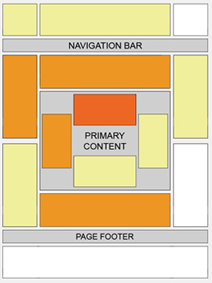
    Best Placement for Google Adsense
  • Provide some free space around ads so that they stand out and users know where to find them. Dont clutter up the ads inside your content.
  • Experiment by changing the location of advertisements. Track them by channels to see which location works. Sometimes unusual locations can can do wonders for your CTR. Google Adsense support provides some good ideas for better blending
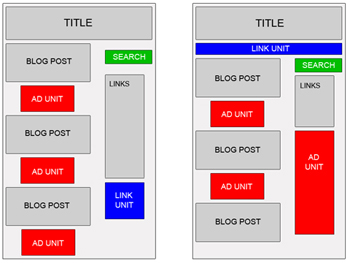
    Google Adsense Placement
  • Many experienced Adsense users have reported better CTR with vertical ads rather than the horizontal ones. But that really depends on your site structure.
  • Usually it is recommended to place towers on your right, as users tend to use the mouse to scroll the bar on the right side wiht a higher chance to see your ads. Some have reported doubling CTR’s by placing towers to the left rather than the right, as people have got bored of seeing ads on the right, it has something to do with the sidedness of the brain which I do not understand and there is a tendency to read from left to the right.
  • Many sites will have small ads in the top right hand corner, as they claim it is the first place where the eye sees.
  • An excellent article on Eyetracking What We Saw When We Looked Through Their Eyes helps to tell you where users actually see first and in what order.
  • Forums are tricky becasue they have a different kind of navigation, readership and participation. Here are some ad placements suggested by Google which work best for forums
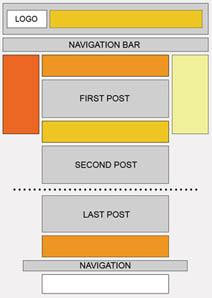
    Google Adsense for Forums

Best Google Adsense Link Colors to get higher CTR?

  • Match the colors of your ads with the colour scheme of your site. Blending with your sites color profile helps to identify them not as ads, but as links similar to those of your site. The more the AdSense looks like part of your site, the higher CTR you will get. You can also match the Adsense fonts with your website font design for great results.
  • Blend ads with your page – remove the borders by having a similar color as your background helps to show ads as being part of your site. Do not blend text or the ‘Ads by Gooooogle’ with your background color as it is against Google TOS (Google does not like hidden text!). However, such blending may not work for you always due to banner blindness. Neither do they see the ads, not do they click on them. So sometimes a bold contrasting ad may work better depending on your website design.
  • Experiment by changing the colors, background of advertisements. You have to find out what works best for your site, not others. You can also rotate Adsense colors to reduce ad blindness.
I hope these tips help to get your Adsense CTR up by at least 100% if not more. Good luck and make more money!
Continue Reading......

How To Easily Find the Best Adsense Format For Your WebSite

Which adsense format is the best for my website ? Which color scheme should i use to get maximum CTR for adsense ads? Does the 336×280 ad format or the 330×250 rectangle ad format works the best? What can i do to get maximum Click Thru Ratio for my adsense ads?
Google Adsense Simultaneously How To Easily Find the Best Adsense Format For Your WebSiteThese are the questions that runs through every webmasters mind when they are concerned about the money from adsense. Most of the new adsense publishers finds it difficult at the initial stage selecting the best adsense format that works for their website. Professional adsense publishers or webmasters advice to keep on experimenting with different adsense formats in your website. But, this takes a lot of time and effort. So, how about testing different adsense formats in your website at the same location simultaneously but randomly? Yes that’s what the professionals do. It seems quite logical too. If you didn’t get the point correctly, then take a look at this example.
You feel that a 728×90 adsense ad format will generate more revenue than a 468×60 banner ad unit you are currently using. So to find it you need to test the leaderboard 728 x 90 adsense format separately. But this can’t be the case some times using the 728 x 90 ad format can affect your earnings badly. But there is a way to display the two ad units, showing each 50% of the time. This is made possible by using a simple javascript.  The random function in javascript will help you to easily alternate between your two ad formats. The method is being called A/B testing.
from the adsense blog
Keep in mind that generally, modifying your ad code is against AdSense program policies. However, we’ve checked with our policy folks and they’ve given our publishers permission to modify the code for use with this specific script for the purposes of A/B testing. Please be aware that the AdSense team isn’t able to provide any support or troubleshooting help for this script or this sort of testing.
So lets start.

Testing Different Adsense Ad Formats at Same Location by Displaying Them Randomly

  • Create Two Custom Adsense Channels. Name them accordingly as per your needs. In this case its 728 x 90 and 468 x 60 but you can use any other formats too like 336 x 280 and 300 x 250 and so on.
  • Now you need to setup the ad formats similarly. What i meant is, when the final code is obtained only google_ad_channel, google_ad_width, google_ad_height and google_ad_format should only be the variables. Every thing else like Title, Color, Font etc should be same, now that would be more logical to test between the two formats simultaneously. However, its not mandatory that you should only use similar looks for the two formats.
  • Now we are going to play with the java script code. Here we are mixing up the to different adsense codes so that each of them will be displayed 50% of the time. And it total both counts to 100% in overall. Here is a code shown as example.
      <script type="text/javascript">
       var google_ads = Math.random();
          if (google_ads < .5){
            google_ad_channel = "468x60Channel";google_ad_width = 468;
            google_ad_height = 60;google_ad_format = "468x60_as";
          } else {
            google_ad_channel = "728x90Channel";google_ad_width = 728;
            google_ad_height = 90;google_ad_format = "728x90_as";
          }
            google_ad_client = "pub-xxx";google_ad_type = "text_image";
            google_color_border = "FFFFFF";google_color_bg = "FFFFFF";
            google_color_link = "0000FF";google_color_text = "000000";
            google_color_url = "0000FF";
      </script>
      <script type="text/javascript"
            src="http://pagead2.googlesyndication.com/pagead/show_ads.js">
      </script>
  • Check out the performance of the two ad formats for a week or two to determine which of the adsense format gives you the best CTR, eCPM. Some times the 336 x 250 ad unit give you more clicks than the 300 x 280. It depends.
The next time after this experiment you can try two formats with a different color format, different font (change fonts in adsense ads), font size etc.
Continue Reading......

Easy way to approve adsense account

Approve your adsense account in easy steps

Many people want to know if they can use and approve thier Adsense application without website or blog at blogspot and wordpress.Yes,it is possible.The easy way is to sign up for new gmail account if you have no gmail account.Sign up for flixya.com using the gmail account which you created earlier.During sign up process for flixya.com you will be asked:

Do you already have Adsense account?
Select: No
Now option to signup for Google Adsense will appear with the same gmail account through which you signed up flixya.After clicking on signup button for Google Adsense you will receive emails in gmail account from both flixya and Google Adsense.Flixya will ask you to continue signup and Adsense will ask you to complete signup process by clicking on the link given in the mail.After completing sign up form with accurate information Google Adsense will ask you to wait for 1-2 days for reviewing your application.Within 1-2 days you will get mail from Google Adsense about approval or disapproval of your Adsense account.
This is not a joke.I have tested it myself and my Google Adsense account was approved within one day after applying for Google Adsense.You can rely on this because flixya is powered by Google.
After getting your publisher id you can easily make account at blogger.com.After posting substantial original content and good traffic on your blog you can add your Adsense ad units on your blog.
You can also use flixya to earn money because they pay you 100% of your revenue you get through page impressions and clicks .
I hope that above information will be useful for everyone especially those who are having problems in approving Google Adsense account.

Continue Reading......

51 Blogging Jobs Listed in About.com Blogging Forum

51 blogging jobs have been listed in the About.com Blogging Forum in the Blogging Jobs folder.  This week's list includes a variety of financial, technical, and business blogging jobs as well as two blog editor jobs with the Village Voice!
Many paid bloggers are required to promote their blog posts across the social web.  In fact, one of the jobs in today's list asks for a blogger who can use Delicious and drive traffic to a blog through social bookmarking.  Read the articles below to brush up on your social bookmarking skills:
Continue Reading......

How To Earn More Money From Google Adsense

OK, so whoever don't know about this topic, I'll explain what Google AdSense is. Adsense is a program that allows us to place an ad in you website or blog. The ads is from Google and if the ads is very often visit by other peoples that visit you site or blog(of course), Google will pay you for the space for ads. The most peoples visit the ads, the most you paid .OK, enough talk. Let's start!

1. You must have a gmail account first, if you don't have just go to mail.google.com and signup. Then comeback here.

2. After signup for gmail you must have website or blog to place the ads. If you have a website just go to the next step. If you don't have money to make a website, just make a blog from Blogger.com . It quiet nice, easy to customize and edit. Just go to Blogger.com and use your Gmail account to sign up, like me. You must make your blog as interesting as possible to make many peoples visit your blog. And you must make them visit your ads. It's pretty though, but if you keep updating your blog with high quality content it's pretty nice. You can store your blog with your diaries or experience, even a magic trick!!If you done with the Gmail account and the blog, then we will go to the final step.Ready?

3. Go to www.google.com/adsense or type "adsense" in google search engine, then follow the instruction. Fill the field with your real identity, or if you are under 18 you can make it with your parents identity. Of course with their permission!!If you done with your adsense, then start promoting your blog or website to your friends, your relative, your family, your parents/children friends, even a STRANGERS. If your mom tell you to not talk with strangers, just screw it as the strangers is not a bad person.Hehehe!!OK, have a nice blog and a nice money from Adsense. I hope your succed can be my succed too.

Your comment is priceless for this blog. Let the others see what you think about this post!
Continue Reading......

The Easiest Way to Make Money Online

In previous post, I just give you the basic of making money online as a blogger. Now, I will tell you the easiest way to make money online for everyone.

PTC (Paid to Click)

In this kind of program, you must click the ads and wait about 30 seconds and then your account will be credited by some cents. Usually, one ad worth $0.01 and this is not profitable, but you can use the referral system. For every person you have referred, you will get about $0.01 and if the person clicks one ad, you will get about 10% of their earnings. If you are a blogger, then you may use your blog as a promotion media for your referral link.

List of Top PTC site at BestPaidToClick.org


Paid Survey

All you must to do is signing up and wait for them to contact you and filled up some question and then you will get about $5-$20 for a single survey. With this method, I don't think it will be profitable. BUT, I know how to solve this problem, all you must to do sign up for a hundred or more programs. At least, everyday you will get one survey and that means you will get $5-$20 everyday.

I prefer TopPaidSurveyReview.com for reviews.

There are many easy methods to make money online out there, but I think these two are the best (for easiest way to make money online award, of course).

Your comment is priceless for this blog. Let the others see what you think about this post!
Continue Reading......

5 Tips for Canadian to Make Money Online

In previous post, the Basic of Making Money Online for Blogger, we know that every blogger in this world can make money online. No matter where they live. But, in this post I will tell you (if you're Canadian) how to make money online for Canadian.

Canada is a big country, and you (the Canadian) can make money online by using your country. How? By knowing about your country, as an example I will take the vacation spot on Canada. Follow these tips to make money online by using the vacation spots of Canada :

1. Make a Blog

People who want to take a vacation on Canada will search a lot of information on Google or Yahoo. Make sure your blog is high ranked and then the people will come to your blog and hopefully they will make you some money.


2. Selling Ebooks

Just make ebooks about vacation spots in some areas, and sell it through your blog. Make sure your ebooks are great enough to make the customers happy. If they happy, they will recommend it to their families or friends, and that's means more money!

3. Review about Travel Agents

Mostly, people will take a tour if they want to take a vacation in other country. So, review one by one the travel agents that you know and give them any details like contact number, or website URL.

4. Take a few Photos

To make sure people trust you, just take a photo whenever you visit those vacation spots. And make sure you are in the photo to ensure people to trust you. If they trust you, then they will be more active to recommend your blog.

5. Don't forget to subscribe

This blog will present more post about make money online, so you better subscribe to this blog. And sometimes I will give you any SEO tips to make your blog highly ranked in Google that will bring you more visitors.

Okay, enough for this post. I hope my post will helps Canadian to make money online.


Your comment is priceless for this blog. Let the others see what you think about this post!
Continue Reading......

7 Things To Appeal Adsense Account

Hi, everyone! I'm gonna tell you my method for appealing for my adsense account. Before we begin, I'll tell you my sad stories. The first time they replied my appeal, they won't change their mind. But, it doesn't make me hopeless. I still try appealing agin and again. But, none of my appeal was replied. And then my mother tell me that people would trust someone from his works. So, I'm send a mail to Google Adsense Support. Yes, a mail not an e-mail. This mail include a few important things that help me get my account approve.

These things are :


1. Your biography
Your biography help Adsense Team to know your personal identities. It much help when you need extra attention from the Adsense Team.


2. Your problem
Write your problem in professional and good language. This will help The Adsense Team understand your problem.


3. Printscreen of Google Analytics
Login to your Google Analytics and show 'em that you are not a cheater. Print the visitor, traffic, and bounce rate section. This will help Adsense Team know more about your site.


4. About your site
Describe about your site in two paragraph. The first paragraph describing the making of your site. The second paragraph describing your activities in your site and how often do you update it.


5. About your visitor
Tell 'em about your visitor, where they came from, what part of communities are they, and what kind of human are they. Also tell them about how you promote your website. If you promote through forums then give them the forums url. Or if you promote through Adwords, then just write your Adwords account data.


6. Your photo
Include your photo and it will help Adsense Team to know more about you. Show your saint face and it will touch the Adsense Team deepest heart.


7. Handwriting
DON'T print your mail. Just write it with your hand, because it's a gift from God. Don't waste your time, write it with good style. No scratch, no dirty, and you'll be fine.


OK, that's enough, now send the mail to this address :


Google Adsense Support
1600 Amphitheater Parkway
Mountain View, CA 94043 USA
Continue Reading......

Top 5 AdSense tips

Top 15 AdSense tips

AdSense Tip #1: Find your keywords


Before serving ads on a web page, check its keyword density. A free and advanced tool for finding the most prominent keywords in a page can be found here: SEO Density Analyzer. Copy the most important keywords to a text file ([web page name]-adsense-keywords.txt).

AdSense Tip #2: Improve your keywords


Get keyword suggestions from Overture Search Inventory and from Google AdWords Sandbox. Get new keywords that can help you improve your ad relevance. Enter the keywords from [web page name]-adsense-keywords.txt and save the suggestions to [web page name]-adsense-suggestions.txt.

AdSense Tip #3: Keep your website focused on a theme


Use the keyword suggestions to enhance your web pages and to build theme-based content. And also try to get your keywords into the anchor text of your incoming links as much as possible. Don't forget that Google AdSense is keyword-targeted advertising: Google AdSense bases its advert topics on your websites content, this means that content-rich websites of a popular topic should attract a large amount of ads.

AdSense Tip #4: Write a new page every day


One of the best tips is to add a new page to your web site every day. The more content you have, the more visitors you will get. Put an Adsense unit on each and every content page of your site. But where? You will find more about that from the next AdSense tips.

AdSense Tip #5: Choose the right AdSense format


Wider formats are successful because the ads are compact, easy to read and are complementary to the content. The top three AdSense formats are:
  1. 336x280 large rectangle
  2. 300x250 medium rectangle
  3. 160x600 wide skyscraper

Another successful format is the 468x15 horizontal ad links, that can be placed under your navigation bar.
Continue Reading......

How To Attract Adsense Brand Advertisers by Ads Above the Fold

It is a well known fact that Adsense ads perform the best when placed above the fold. “Above the fold” refers to the exact area of the screen which is visible to the user when the page has finished loading.
The area of your website or blog which gets the maximum focus is “Above the fold”. Hence, it’s common sense that advertisers would prefer sites who place ads above the fold as compared to sites who hide ads in the corners or sidebars.

Who are Brand Advertisers and Direct Advertisers?

There are two type of advertisers - Brand advertisers and Direct advertisers.
Direct advertisers look for clicks and conversions and they usually target CPC campaigns. Say Mr X owns a site about ‘Used cars’ and Mr Y is a “Direct advertiser”. Mr Y would like to place CPC advertisements in Mr X’s site and would be more interested in clicks, conversions and the Adwords campaign altogether.
Brand advertisers would focus on promoting their product and raise self awareness. They would target image ads that supports rich media. In the above example, if Mr Y had been a direct advertiser, he would like to place an image ad about his upcoming auction of used cars, you get the idea.

So What’s the Idea all about

Since brand advertisers are trying to raise awareness about their product, they are obviously selective on the type of sites where their ads are shown. Not only that, they are also concerned with the position their ads are shown on your site.
Now coming back to “Above the Fold” concept. Since Brand advertisers want visibility, they would prefer sites that have the following criteria and placements of ad units:
  • Content is unique, good and the site should have a targeted audience.
  • Has a large reader base – means more pageviews and impressions.
  • Ad unit is placed above the fold for greater visibility.

How to optimize Your Ad unit Placements for Brand Advertisers

If you want to optimize your site for Brand advertisers, here are a few things you should know:
1. Use Adsense placement targeting
Assign unique channels to the ad units you are targeting for the Brand advertisers. Then login to your Adsense account, go to channels and click “Edit channel”. Select the checkbox “Show this channel to advertisers as an ad placement”.
adsense channel targeting
Enter a custom description of your site and a brief description regarding the placement position of the channel. Believe me, this works.
2. Place ad units above the fold targeted to attract “Brand Advertisers”
Place at least one ad unit above the fold. Then use Adsense placement targeting and attract advertisers to show ads on that channel. The placement targeting would not work out if you  hide the ads in the bottom of your blog template.
3. Switch to image ads on high pageview pages
Some pages of your site have high pageviews e.g the homepage or may be the landing page you created for one of your products. Using an image ad above the fold makes sense and appeals to the brand advertisers, as described earlier in the article.
4. Don’t be shy showcasing ads
Don’t hide advertisements in the corner or footer of your blog template. Some of the best placement positions are: under the title of your post, header, top of sidebar etc. Even big brands like Techcrunch have a big leaderboard in the site header, so why should you feel shy showing the ads?Your browser may not support display of this image.
Ads above fold
If the visitor is genuinely interested on the content of the landing page, the advertisements would appear as related links or services. So there is nothing called as “Annoying Factor”. Dump that idea.
5. Make your Site Advertisement Friendly
While you make efforts to optimize your site for visitors, you should also make life easy for the advertisers. Reserve highly focused regions for the advertisements and remove unnecessary elements from your blog template. As for example, you may want to move the email subscription box, which is placed in the header of your site to the sidebar. Then use a 468 X 70 or 728 X 90 advertisement block in the header and apply “Image ads” for that ad unit.
These are a few techniques which you can use to attract “Brand Advertisers” on your site. Don’t think that you will get the results in a couple of days. It takes some time to build trust among the advertisers and you will gradually see the wheel rolling.
Have you optimized your site for Brand advertisers? Would love to hear your ideas in the comments section.
Continue Reading......

Google AdSense Optimization Tips

1. Don’t Feel Shy – If you are seriously willing to monetize your website with AdSense, make sure that you place advertisements in prominent locations where visitors will notice the ads.

2. The best performing ad units for AdSense are 160×600, 336×280 and 300×250. For text only ads, you should go with the 336×380 format but in all other situations, 300×250 may be a better format since it is most popular among advertisers and also supports rich media. 160×600 can easily fit in the sidebar of your blog.
3. Web visitors have a very short attention span and majority of them may simply leave after a quick glance. Their eyes follow a F pattern so you can get good results if the Google ads are placed in the areas colored red on the heat map. Sidebars and leaderboards at the top are often ignored.
4. Depending upon the layout of your website, you should consider placing the first unit somewhere in the middle of the page and above the fold.
5. Even kids would know that AdSense works best if there are no borders and that the background color of the ads matches with the background of the page. That may not always be true and sometimes colored backgrounds (like light yellow or very light grey) can convert better – look at the top AdWords unit on the Google search page.
6. If you have a website with a dark theme (like a black background), experiment using a contrast color scheme for Google ads.
7. While it is a good idea to use section targeting around the main content, you should skip adding the section targeting tags for the comment section in your blog because the comments may not exactly convey what the page is all about. The aim is to increase the relevance of Google Ads.
8. Site visitors generally look for a search button at the top left region. Use the word "search" in the submit button else some visitors may not notice them. AdSense doesn’t allow publishers to pre-populate search boxes with keywords. Always use a second search box at the bottom of your pages and if possible, host site search on a separate sub-domain (e.g., search.labnol.org/) as regular readers can easily remember that address.
9. I recommend using only text ads for the first Google Ad unit but place another 300×250 unit in the sidebar (or somewhere below the fold) – these generally serve CPM based ads and will therefore help you monetize visits from places like Digg and StumbleUpon even when the bounce rate is very very high.
The CPM of ad units will decrease as you come the page but that may not be the case with link units – they are small, text based, can fit in even small locations and perform brilliant.
10. These are recommended ad placements for a website depending upon the design (two-column or three-column). If you write long articles, try fitting an ad unit somewhere in the middle of the article or at the bottom because when readers are done with reading, they’ll probably look for more resources or related information.
11. Once your new ad placement is live, make sure you test the AdSense layout with help of your grandma or subscribe to a professional mouse tracking service like CrazyEgg to know how people interact / navigate your content.
12. Sometimes traffic flowing in from Image search engines can earn you more AdSense Revenue than regular web traffic. So upload good quality images and use text captions with alt tags to make sure that blog images rank good in Image Search results.
13. Flickr is another great source of traffic (especially from Yahoo!) and you may also use it to indirectly improve your organic rankings.
14. You can also increase relevance of Google Ads on your site by linking to authority websites using descriptive anchor text. This will also help improve your organic ranks since outgoing links and citations carry weight in the eyes of the search engine who may then consider you as an authority for that niche.
15. Look for variations in Google Analytics – AdSense reports. If you are seeing impressions for a page but no CTR or CPM, chances are that the page may be serving PSAs or the ads aren’t relevant enough. You may also use the AdSense Sandbox to figure out if visitors from other countries are unable to see ads on some page that have low (or zero) CPM.
Also see: How to Enable Analytics in AdSense
16. Placement targeting is an excellent opportunity for you to market your site to potential AdWords advertisers. Therefore always make it a practice to use descriptive text when describing your AdSense channels.
17. Archives, Tags, Category or Author pages in a blog aren’t good landing pages and are hard to monetize as well. Redirect their Google juice to single post page using NOINDEX, FOLLOW tags.
18. Reward your regular visitors (I call them influences) with ad-free content. AdSense in feeds is not a loved option either so you may have use the feed footer to find spammers & feed scrappers.
19. If you run a multi-author blog, you can very easily implement AdSense Revenue sharing through channels. Assign a separate channel to each other and use that number for his or her blog posts.
20. AdSense Premium sites like CNN, Mahalo, New York Times, About.com, etc. generally have dedicated AdSense account managers to help them optimize their Google ad units. You can study their layouts and probably implement some of the techniques in your own blog(s).
Another great resource are these official Case Studies discussed on the AdSense blog. Folks like Jensense, Problogger & Barry Schwartz are also pretty good at spotting trends early and often. I also recommend joining the AdSense forums at Webmaster World – especially follow conversations of "Preferred" or "Senior Members" as they generally have lot of experience.
With Google AdSense, one should never feel complacent because there’s always a chance to improve earnings provided you are willing to experiment. The software theory – "If it ain’t broke, don’t fix it" doesn’t really apply here.
Continue Reading......

5 Tips to Boost Your Adsense Revenue


Google AdSense program has made it easier for webmasters to make money through a website. Webmasters who run an AdSense campaign will display Google's contextual Ads relevant to the content of their sites and thus encouraging visitors to click the ads and earn money for each ad click.

However you will earn very little AdSense revenue if you don't know how to optimize your AdSense ads on your website. Here are some tips to increase your AdSense earning:


1. Focus on one Adsense ad format. The Large Rectangle (336X280) ad format seems to work better than other ad formats because this format tends to result in higher click through rates (CTR). Another reason is that the ads will look like normal web links that visitors use to click on them. It doesn't matter whether the visitors know that they are clicking AdSense ads or not, as long as there are clicking, you earn AdSense commission.

2. Create a custom palette for your ads. Select a color that matches your website's background. If your site's background is white both, the color of ad border and background should set to be white too. Also the color of the ad title should be similar to coloe of the links in your website. This is to make your AdSense ads look like it is part of the web pages. Again, this will boost AdSense CTR.

3. Don't place your AdSense ads at the bottom of your webpages because it is proven to be less effective. Displaying your AdSense ads at the bottom is like hiding your AdSense and thus leads to low CTR and AdSense revenue. Try to put them in the place where people can see them quickly. You will be amazed how the difference between AdSense locations can make when you see your earnings.

4. Try to place your AdSense ads near rich content as visitors main focus usually are your content. There are several ways to insert AdSense ads into your content and one of the ways is place your AdSense just after the end of your content.

5. Try to automate the insertion of your AdSense code into the webpages using SSI (or server side included). Ask your web administrator if your server supports SSI or not. How do you do it? Just save your AdSense code in a text file, name it as “AdSense text”, and upload it to the root directory of the web server. Then use SSI, call the code on other pages. This tip is a time saver especially for those who are using automatic page generators to generate pages on their website.

These are some of the tips that have worked well for some who want to generate hundreds and even thousands on their websites. There are other ways to optimize your AdSense that produce high CTR also. You can learn more tricks by reading in AdSense and webmaster forums.

Continue Reading......

Getting Approved by Adsense In First Try

I don’t understand why everyone makes Adsense out to sound like some kind of devil. So
far, I have a 100% approval rate for my consulting clients. You would think that we
spend months developing the site to submit for approval – but to be honest; I spend less
than a day (if that!)
What we found is that Google is not nearly as picky as they make themselves sound to
be. The trick is to make your site in such a way that you are just providing content; we
have found that the less selling you do on your approval site, the better.
Don’t worry, once you’re approved you can use that code wherever you want – so put it
on other sites that sell later. But for the purposes of getting approved, try to limit to just
content, content and more content!


Now, for the disclaimer before we start talking about how to get your site approved for
Google Adsense. I am not a member of Google at all, everything I am about to say is all
speculation and experience. I have helped over 50 clients get approved for Google
Adsense without having even 1 of them not get approved – we have 100% approval rate
on FIRST try.
All I am going to teach you is exactly what I do for them.
There are three main elements that I focus on when getting a client approved:
1.Site look and feel – Not that Google wants a $10,000 professionally designed website,
but they also don’t want some piece of junk. Make sure to at LEAST have a presentable
website – even if it is just a few tables and a solid background color. Avoid using tacky
backgrounds or unprofessional color contrasts.

2.Content – The most important – Google believes in content. If you try to get a website
with just a few pages approved, I don’t think you will have any luck. You need to have at
least 15-20 pages, preferably, 15-20 pages of articles/resources, a.k.a. content.
3.Traffic – Many “experts” say that Google looks to see what kind of traffic you have and
that they do not approve new sites with no traffic. My experience says that these experts
are FULL of it. BUT, just to be safe, before you submit your site for approval – try to get
your site some traffic.
Here are useful tips you need to make the entire approval process easier and quicker:
>> Get content from article directories like www.goarticles.com – just put those articles
in your site, getting 15-20 is easy.
>> Before you submit your site for approval, post at some forums with your website’s
link in the signature file – this will help you get some immediate traffic.
>> Make a very simple website with 15-20 articles, a contact us page, a privacy policy
and the typical disclaimer.
That’s it – you’re ready to get approved for Google Adsense. I know I made it sound too
easy, but honestly, we have a track record that proves it. And remember, if you do not
get approved, you can always fix things and try again.
So, stop waiting – apply now – Google Adsense is a great source of income.
Continue Reading......

Add adsense at body post

I find this article from other blog when i confuse how to insert adsense code to my body post at blogger and just want to share it to another.

I assume you have a Google AdSense account. If you don't, you can create one using the same login through your Google account. You will be assigned a Publisher identity number which shall appear in all your AdSense codes.

After login google adsense go to "AdSense Setup" tab, follow the instruction until you get the code that you must copy to your blog later.


Next, select “Ad unit” and follow their instructions on picking the size of ad, color combination, and so on, right till the end when they automatically generate a HTML code for you. Copy this code and paste it into Microsoft Notepad. (If you are a WinXP user, click the Start button at the bottom left corner of your screen. Under All Programs -> Accessories, you should see the MS Notepad icon.)

Change the AdSense code

This heading may sound misleading. We are not at all altering the code but converting some of the characters to character entities. We have to parse the AdSense code so that it can be included into your Blog template. This essentially involves replacing the following HTML characters:-

< with <
> with >
" with "

Your final Google AdSense Code should look something like this:
<script type="text/javascript">


Insert code into template

Login to your Dashboard. Go to Template -> Edit HTML and click the box next to “Expand Widget Templates”.

Block copy the entire HTML code for your site that you presently have and save it in a separate text file in MS Notepad. This is one of the two necessary steps whenever you want to change the template. The second step is to “Preview” the new changes, and save the changes only when you are satisfied. The backup you have saved in a text file will come in handy when you accidentally click to save the changes without previewing them. With a backup, you can easily restore the template to the prior state if need be.

Now search for post.body through your browser's search function (Ctrl+F for Firefox and IE). You should see these lines:


class='post-body'>
>.body/>>

style='clear: both;'/>
>


If you want the AdSense ads to appear between the post title and post body, add the following code above the orange lines. If you want the AdSense ads to appear immediately after every individual post, add the following code below the orange lines. The code to add is:


style='float:left;'>
AdSense Code
>


The AdSense Code is the one you have amended above in MS Notepad. Do NOT save the template, but click the Preview button to see if you like the placement of the AdSense ads.

Do you want to have the AdSense code on the left of your text as shown in this screenshot?


Choose the smallest AdSense format like 125x125. Insert the AdSense code here:


class='post-header-line-1'/>

style='float:left;'>
AdSense Code
>

class='post-body'>
>.body/>>

style='clear: both;'/>
>


If you want the Ads on the right of the text, like this:


Insert the code as follows:


class='post-header-line-1'/>

style='float:right;'>
AdSense Code
>

class='post-body'>
>.body/>>

style='clear: both;'/>


Set the AdSense ad margins

If your AdSense ads are too close to the edge, you may set a margin in the style tag. To give you an idea how wide the margin should be, you can see the sample in our other Business Fables blog where the left margin is set to 30px. The code used was:


style='float:left; margin-left:30px'>
AdSense Code
>


Should you want to align the AdSense ad to your text, you can specify a margin or padding around the entire AdSense code. The code you can use is:


style='float:left; margin:5px 10px 15px 20px'>
AdSense Code
>


The first number 5px is for the top margin, 10px is for the right margin, 15px for the bottom margin, and 20px for the left margin. You should of course change these values to suit your template.

Preview the template and if you are satisfied, save the template and refresh your Blog to see the new positions of your AdSense ads.

Additional money-making opportunity

Since we are on this topic of earning revenues through AdSense, you may want to consider earning money while you are surfing the net. AGLOCO seems to have an interesting scheme which you may want to take a look. If you are surfing the net anyway as part of your daily routine, why not earn the extra income as well. You may also want to consider having AuctionAds to display an eBay auction widget which are compatible with AdSense and other ad systems.
Continue Reading......

The One Simple Trick That Can Double Your Adsense Revenue

I've been working with Google's Adsense program for a while now. If you're not
already in the program, why not take a look at it now at
https://www.google.com/adsense. I really like Adsense. It makes me money
and it's easy to work with. Just some simple copy & paste into your webpage
and you're done. Right?
Wrong! You can do it that way if you want. Who knows? Maybe you'll get lucky
and get a lot of clicks. But if you're really serious about making a lot of money
with the program, you're going to have to tweak it a little.
I've invested quite a bit of time experimenting with the program. When I first
signed up, I got some clicks and made a tiny bit of money. That wasn't good
enough. I knew there must be a way to get more of my visitors to click on the
ads.
Google has a strict policy about not pointing to the ads in any way or asking
people to click on them, so there were two things I couldn't do. What else was
there?
Then I remembered reading an article once that discussed the psychological
impact of colors on the human mind. I started researching everything I could
find on the subject.
After a lot of reading, many tests and periods of watching my clicks go up and
down, I found the one color combination that seemed to work the best.
Testing previously done at supermarkets had revealed that the same product
could pull more sales from just changing the colors of the label. What were
these colors? Red and yellow! The combination of these two colors has an
immediate impact on the person who sees them. They make your eyes stop and
focus. They pull your eyes right to that part of the page. They grab your
attention! I'm not sure exactly why the combination of red and yellow does this,
but it does. On one of my sites, I changed my Adsense ads to a bright red
border and a yellow background with black text and URL.
My click through rate more than doubled with just that one simple change.
That's what worked on my site. Your site's color scheme may work better with a
slightly different color combination. Try lots of different color variations. Make a
change in the morning and let it ride for the whole day. The next morning, try a
different set of colors. Change the border, background, text. Change everything
you can. Most importantly, keep detailed records of the color scheme you used,
click ratio and revenue generated.
After you've done all the experimenting you want to, go back to the most
profitable one and let it run for a week or so and see how it does. I'm always
trying different colors even after my run of good clicks with red and yellow.
There are a lot of color combinations to choose from. You never know when
you'll find just the right one.


Article Source: http://EzineArticles.com/
Continue Reading......

How Search Engines Work and What to do to Rank Well?

Hello Everyone,
Do you want to rank up your blog on search engines? If so, you must have to have some knowledge about: How search engines work? So lets start learning.
The process, how search engines work can be explained into three steps:
STEP 1: Crawling
STEP 2: Indexing
STEP 3: Serving Result

Continue Reading......

Top 5 AdSense tips

AdSense Tip #1: Find your keywords

Before serving ads on a web page, check its keyword density. A free and advanced tool for finding the most prominent keywords in a page can be found here: SEO Density Analyzer. Copy the most important keywords to a text file ([web page name]-adsense-keywords.txt).
AdSense Tip #2: Improve your keywords
Continue Reading......

Adsense Tip For Blogger

How do you make money from the Google Adsense Program? What AdSense Tips can you share with us?
I have been asked this question so many times in the past few weeks that I thought I should write something on the topic. It seems increasingly bloggers want to try to cover their hosting and ISP costs with some revenue from their blog – and increasingly they’re doing it and are able to make a few (or quite a lot) dollars on the side. Many are turning to Google’s Adsense program.
Continue Reading......

9 Tricks I Used To Triple Your AdSense Earnings In 30 Days

I have been using Google AdSense to monetize my blogs and websites for as long as I remember. In fact it was the first method I ever tried (I made a whooping $15 on my first month… back in 2005). Over the years I migrated to other methods (e.g., direct sponsors and affiliate marketing), which made AdSense become merely an inventory filler. I was still making around $1,000 monthly from it, but whenever I could I would use other methods over it.
Continue Reading......

How to Prevent and Monitor Invalid Clicks, and keep an AdSense Account in Good Standing [a Statement from AdSense]

Over the last week or two there’s been an increase amount of chatter on forums and blogs about invalid clicks and AdSense. Some of the talk has contained information that has been a little confusing and perhaps even ill-informed (and some ‘influenced’ by companies with their own agendas) – so I got in touch with AdSense and asked if they had any information to help their publishers protect themselves against invalid clicks.
The following is what they replied with – in their words it is ‘a concise guide to how to prevent and monitor invalid clicks, and keep an AdSense account in good standing.’ I hope that it is helpful to AdSense publishers everywhere:
Continue Reading......

Followers